


Last week, this blog's internet address or URL was http://rom1975.blogspot.com but, now, it's http://www.rom1975.com. I recently purchased the domain name rom1975.com from NameCheap and used it on this blog.
The price to register the domain name was only $10.69 USD but I paid less than that because I used a special NameCheap coupon that gave me a little discount. This special coupon is only available for the month of October 2012 and it's called SPOOKYDEAL.
After successfully registering the new domain, the next thing I did was use it on this blog. Setting-up the new domain name was easy. What I did was go to this blog's Settings page and clicked on the +Add a custom domain name link under the Publishing section. Clicking on it expanded the section.

When the Publishing section expanded after clicking the +Add a custom domain name link, a form field appeared and it asked me to buy a new domain name for my blog. I don't need to buy a new domain name because I already bought one from NameCheap.
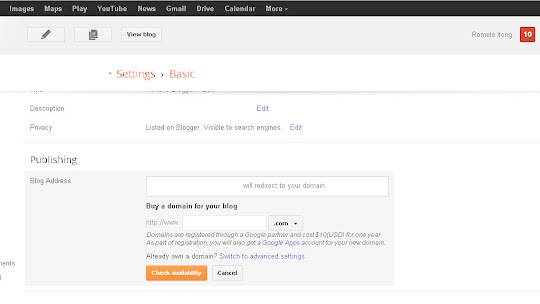
Instead of buying a new domain name, I clicked on the Switch to advanced settings link. Clicking on it made the Advanced settings form field appear but before I could enter my new domain name, rom1975.com, I first configured its host record in NameCheap.

I could probably write what I did but it'll be much quicker to just show what I did to make my new domain name from NameCheap work with my Blogger or blogspot blog. Simply view the screenshot below to see how I setup my new domain name's host record in NameCheap.

After updating my host record in NameCheap, I went back to my blog's Settings and entered the new domain name in the form field and clicked on the Save button. If it didn't work immediately then it just means that the domain name hasn't propagated enough yet. I simply waited a few hours and tried again. This time it worked.

Basically, this was how I setup my new rom1975.com domain name from NameCheap in Blogger. I'm not sure if I presented it very well but, as you can see, it was very easy. If you have a Blogger or blogspot.com blog and you want it to have its own domain name then you can purchase one at a very cheap price from NameCheap.
Anyway, I just hope this simple rambling of mind can help those who wish to setup a NameCheap hosted domain name in Blogger. Goodluck!
The price to register the domain name was only $10.69 USD but I paid less than that because I used a special NameCheap coupon that gave me a little discount. This special coupon is only available for the month of October 2012 and it's called SPOOKYDEAL.
After successfully registering the new domain, the next thing I did was use it on this blog. Setting-up the new domain name was easy. What I did was go to this blog's Settings page and clicked on the +Add a custom domain name link under the Publishing section. Clicking on it expanded the section.
When the Publishing section expanded after clicking the +Add a custom domain name link, a form field appeared and it asked me to buy a new domain name for my blog. I don't need to buy a new domain name because I already bought one from NameCheap.
Instead of buying a new domain name, I clicked on the Switch to advanced settings link. Clicking on it made the Advanced settings form field appear but before I could enter my new domain name, rom1975.com, I first configured its host record in NameCheap.
I could probably write what I did but it'll be much quicker to just show what I did to make my new domain name from NameCheap work with my Blogger or blogspot blog. Simply view the screenshot below to see how I setup my new domain name's host record in NameCheap.
After updating my host record in NameCheap, I went back to my blog's Settings and entered the new domain name in the form field and clicked on the Save button. If it didn't work immediately then it just means that the domain name hasn't propagated enough yet. I simply waited a few hours and tried again. This time it worked.
Basically, this was how I setup my new rom1975.com domain name from NameCheap in Blogger. I'm not sure if I presented it very well but, as you can see, it was very easy. If you have a Blogger or blogspot.com blog and you want it to have its own domain name then you can purchase one at a very cheap price from NameCheap.
Anyway, I just hope this simple rambling of mind can help those who wish to setup a NameCheap hosted domain name in Blogger. Goodluck!


