


When I started this blog, ROM'1975, earlier this year the blogger template that I used on it was a modified version of the very popular Ads Theme Blogger Template. It wasn't just a popular blogger template, it was also my favorite. In fact, I used it on almost all my other blogger or blogspot blogs.
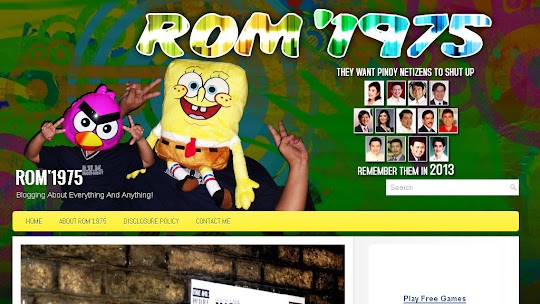
(Modified or Customized ProFinance Blogger Template)
Last week, I modified it again by changing the header graphics and adding a background image but, this week, I decided to use a different blogger template other than Ads Theme. Don't get me wrong, the Ads Theme blogger template is still my favorite and I'll still use it whenever I can but, for now, I'm going to use a different one on this blog.
As you can see, the Blogger Template that I'm using now is a modified version of the ProFinance Blogger Template. I downloaded the original ProFinance blogger template for FREE from PremiumBloggerTemplates.com and I modified or customized it according to my preferences.
After installing the template on this blog, what I did next was, I changed its background and header graphics. I added a background image, made the header area taller and applied a custom made header graphics on it. Those changes were already enough to change the over-all look and feel of the template but I didn't stop there.
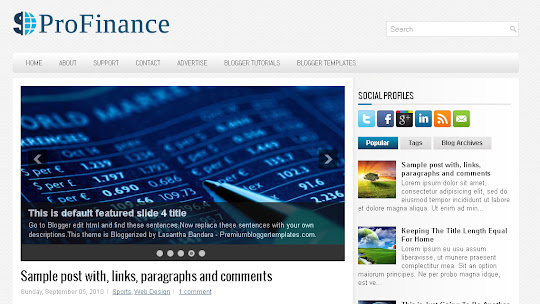
(The Original FREE ProFinance Blogger Template)
I also changed most of the colors used in the original ProFinance Blogger Template from gray and blue to yellow and green. I chose yellow and green because those two colors matched the colors of the background image. The only colors that I didn't change were those used on the links, body text, sidebar text and those used on the body of the blog itself.
Anyway, modifying the free ProFinance Blogger Template was very easy. All I did was change a few stylesheet codes and the result was a modified or customized ProFinance Blogger Template specially made for this blog, ROM'1975.
So, are you also using a Free Blogger Template? Did you also customize or modify it according to what you like it to look?
For those who wish to get their own copy of the ProFinance Blogger Template, click here.
(Modified or Customized ProFinance Blogger Template)
Last week, I modified it again by changing the header graphics and adding a background image but, this week, I decided to use a different blogger template other than Ads Theme. Don't get me wrong, the Ads Theme blogger template is still my favorite and I'll still use it whenever I can but, for now, I'm going to use a different one on this blog.
As you can see, the Blogger Template that I'm using now is a modified version of the ProFinance Blogger Template. I downloaded the original ProFinance blogger template for FREE from PremiumBloggerTemplates.com and I modified or customized it according to my preferences.
After installing the template on this blog, what I did next was, I changed its background and header graphics. I added a background image, made the header area taller and applied a custom made header graphics on it. Those changes were already enough to change the over-all look and feel of the template but I didn't stop there.
(The Original FREE ProFinance Blogger Template)
I also changed most of the colors used in the original ProFinance Blogger Template from gray and blue to yellow and green. I chose yellow and green because those two colors matched the colors of the background image. The only colors that I didn't change were those used on the links, body text, sidebar text and those used on the body of the blog itself.
Anyway, modifying the free ProFinance Blogger Template was very easy. All I did was change a few stylesheet codes and the result was a modified or customized ProFinance Blogger Template specially made for this blog, ROM'1975.
So, are you also using a Free Blogger Template? Did you also customize or modify it according to what you like it to look?
For those who wish to get their own copy of the ProFinance Blogger Template, click here.


